Backups
Back up a database service with pgBackRest to a local and a remote copy, on a schedule or on demand, with retention and checksum checks.
Backups use pgBackRest. Manage them on the Backups tab of a database service. An admin edits the backup settings. An operator can apply them and trigger a backup.
To back up the console itself, see Console backups.
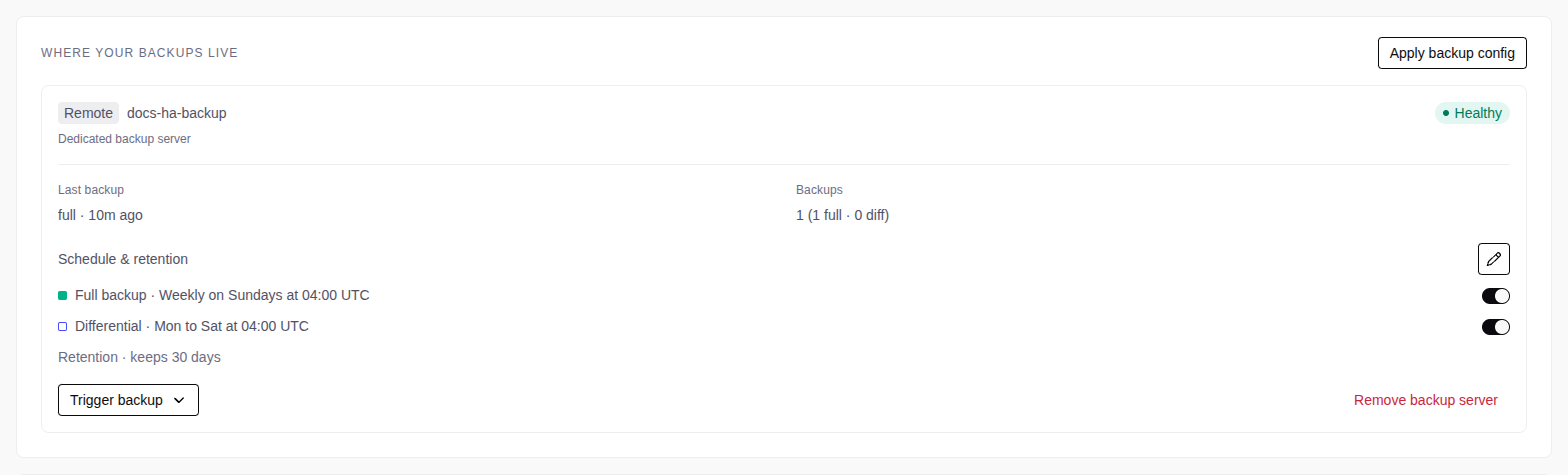
Copies
| Copy | Location | Services |
|---|---|---|
| Local | On the database server | Single-node services only |
| Remote | On a dedicated backup server | All topologies. Add it when you create the service, or later with Add a remote copy. |
An HA service with no backup server has no backups.
Services that share a backup server must run the same pgBackRest version. The console refuses a deploy that mixes two versions. Upgrade the older service first.
Actions on a copy:
- Disable local backups stops the local backups. The data stays on disk. Enable local backups starts them again.
- Remove backup server stops the remote backups. The copy shows Deactivated, restore source, and you can still restore from it. Re-activate starts the backups again.
- Delete backup data deletes the backups of a deactivated copy. You cannot undo this.
Schedules and retention
| Setting | Local copy default | Remote copy default |
|---|---|---|
| Full backup | Off. Sunday 03:00 UTC (0 3 * * 0) |
On. Sunday 04:00 UTC (0 4 * * 0) |
| Differential | Off. Monday to Saturday 03:00 UTC (0 3 * * 1-6) |
On. Monday to Saturday 04:00 UTC (0 4 * * 1-6) |
| Retention | 7 backups | 30 days |
Edit the copy
On the copy, select Edit schedule and retention (the pencil).
Set the schedules and the retention
- Full backup and Differential: turn each on or off, and set a five-field cron expression in UTC.
- Retention: 1 to 100, in days or in backups. Retention counts full backups. A differential backup goes with its full backup.
Select Save changes. The servers do not change yet.
Apply the change
Select Apply backup config, then Apply config.
To cancel pending changes, select Discard, then Discard changes.
Automatic first backup
After the first deploy of a service, and after a restore, the console takes a full backup to each copy. If it fails, the service continues to run. Use Trigger backup to try again.
Manual backups
Select Trigger backup, then Full backup or Differential backup. The progress shows in the operations of the service.
An operation with the status Warning and the message Backup completed. Old backups and WAL were not removed: has a good backup, but old backups were not deleted. Correct the cause in the message, or the backup disk continues to fill.
Checksum errors
When a backup finds invalid page checksums, Backup history marks it with Checksum errors. Some data files of the service are corrupt. See Backups found corrupt pages.